RotoSpider manual › Share and get help
Send a support bundle
Describes RotoSpider Desktop 0.8.14 · checked 2026-09-13 D5
When something goes wrong in the desktop app, a crash, a layout that looks wrong, a workbook that will not load, the fastest way to get help is to send a support bundle: a ZIP the app keeps ready, holding what it needs to reproduce what you saw. Nothing is uploaded on its own; you choose to export a bundle and you send it.
What a bundle is
The desktop app records each session as it runs and keeps a ready-to-send ZIP for sessions that ended normally and for sessions that ended unexpectedly. As the Settings tab says, a bundle holds settings, master data, layout workbooks, schedule documents and the replay operations: the list of what was done in the session, the messages exchanged with the layout engine, the pointer gestures made on the spider, a debug log, and a few snapshots of the open layouts, taken at start-up and around each save and open. It also holds the shapes the session used and the file chosen for each shape import. In the ZIP, file paths on your computer and anything that looks like a password or a key are blanked out. After a crash, the ZIP can also hold the crash's dump file as it is, and that file can show folder names and parts of the open document. It holds nothing else from your computer.
Where to find them
On the Settings tab, the Support bundles section shows how many bundles are kept and their total size:
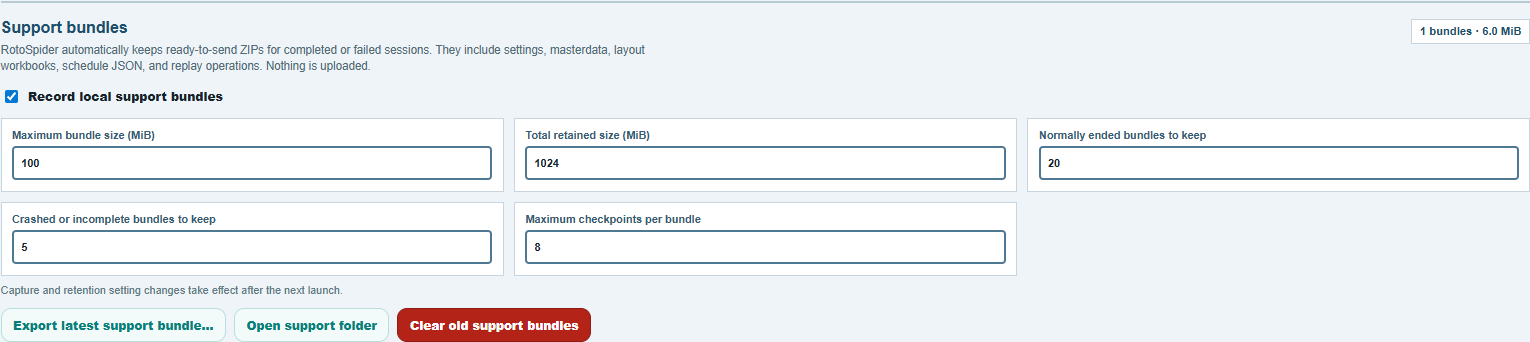
Export latest support bundle…saves the most recent bundle as a ZIP where you choose, and confirms withExported <file> (<size>).This is the file to send.Open support folderopens the folder where the app keeps them, if you want an older one.Clear old support bundlesdeletes the kept bundles to free the space, after asking; the running session is kept.
On Windows, that folder is state\<version>\sessions in your working folder, where <version> is the name of the version's exe without .exe. A session's ZIP is named RotoSupport_ with the date and time the session started. Send the bundle you need before you delete or rename a version's exe: the next start of any version deletes the folders of a version whose exe is gone, its bundles with them.
On a Mac, it is ~/Library/Application Support/RotoSpider 0.8.21/sessions for version 0.8.21, and on Linux ~/.config/RotoSpider 0.8.21/sessions.
After a crash or a freeze
After a crash, or after the app was ended in Task Manager, the next start of the same version says so: The previous RotoSpider session ended unexpectedly. with A local support bundle is available. Nothing was uploaded. The notice's Export bundle… saves the bundle of the session that failed. Until you close the app, Export latest support bundle… saves that bundle too.
If the app stops responding, end it in Task Manager and start it again. The notice then appears. When a click or a key has gone unanswered for about 15 seconds, the bundle notes the step where the app stopped, with a picture of the window.
Settings you can leave alone
Record local support bundles is on by default; switch it off and the app records no new bundles. The numbers under it cap what is kept: the size of one bundle, the total size kept, how many normally ended and how many crashed or incomplete sessions to keep, and how many snapshots one bundle may hold. A change takes effect after the next launch, and Apply at the bottom of the tab confirms it. The app refuses limits that cannot work together, one bundle must fit within the total.
Sending it
Export the bundle and send the ZIP with a few lines: what you were doing, what you expected, what you saw, and about when it happened. A ZIP is small: about 30 KB for a short session, and up to about 1 MB when the session used shaped molds. Send it as a file in WeChat, or to the address on the About page. The bundle carries your master data and layouts, so send it the way you send other factory files.
Comments and questions
The app's rules are our reading of the physics; where your plant knows better, the app changes.