RotoSpider manual › Start here
Install the desktop trial
Describes RotoSpider Desktop 0.8.23 · checked 2026-10-27 GMK
The desktop trial is one download per system, each holding RotoSpider and RotoScheduler together: a ZIP for Windows, a signed and notarized disk image for macOS on Apple silicon, and two AppImages for Linux. All three are on the download page, with the version for each platform and how long each trial runs.
The trials are a beta in fast iteration, and upgrading a trial may not carry your data over automatically. If you run into trouble with this, contact us for support at [email protected].
Windows
- Make a new working folder on this computer's own disk, near the root of a drive, for example
D:\RotoTrial, and unzip the download into it, so thatRotoSpider_TRIAL_EN_<version>.exe,RotoScheduler_SCHEDULER_TRIAL_EN_<version>.exeand the foldersprogram\anddata\trial\sit in that folder. - Run
RotoSpider_TRIAL_EN_<version>.exe. If Windows shows its SmartScreen notice the first time, choose to run it anyway; the files are signed. The first start of each version unpacks it into the folder, with a progress window. - Start RotoSpider from that EXE every time. RotoScheduler, the separate production-planning program, starts from its own EXE in the same folder and reads the molds and arms you save here (its manual).
Everything the trial keeps is in the working folder, for both programs:
RotoSpider_TRIAL_EN_<version>.exe             one file per version you keep
RotoScheduler_SCHEDULER_TRIAL_EN_<version>.exe
data\trial\                                   your workbook, settings and shapes; RotoScheduler's
                                              plans in data\trial\schedule\
program\runtime-1\                            shared by the versions of both programs
program\                                      the unpacked versions
state\                                        each version's recovery copies and support bundles,
                                              and your acceptance of the trial licence
To move to another computer, close both programs and copy the whole folder. Layout files go where you save them. Not supported: a working folder on a network drive or a USB stick, in a folder a sync tool manages (such as a Desktop backed up by OneDrive), with a long path, or used by two Windows accounts.
macOS
- Download the macOS
.zip, unzip it, and open the disk image inside. - Drag
RotoSpider <version>andRotoScheduler <version>into Applications, then open RotoSpider from there. The disk image is signed and notarized; macOS may ask you to confirm the first open. - When macOS asks whether the program may access your Documents folder, allow it: both programs keep the trial's data in
Documents/RotoSpider/trial/. If you refused, the program closes at every start; turn Documents on for it in System Settings, Privacy & Security, Files and Folders.
Linux
- Download the Linux
.zip(Ubuntu 24.04 or newer) and unzip it anywhere. It holdsRotoSpider-<version>-x86_64.AppImageandRotoScheduler-<version>-x86_64.AppImage. - Run the RotoSpider AppImage. If your unzip tool dropped the execute permission, restore it first with
chmod +x *.AppImage.
If Ubuntu 24.04 reports that libfuse.so.2 is missing, install libfuse2t64
(sudo apt install libfuse2t64) and run the AppImage again.
The first start
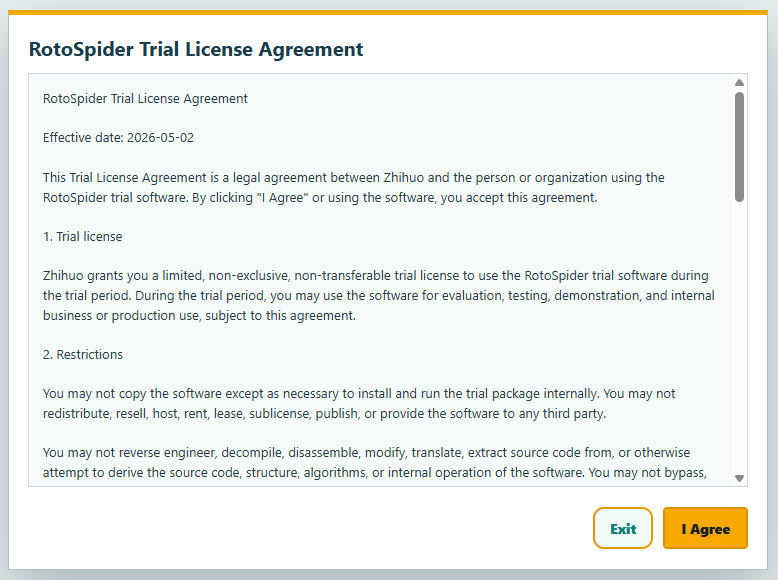
When the trial starts in English for the first time, it shows the trial licence agreement. Read it and choose I Agree; Exit closes the app.
RotoSpider then copies the trial master data workbook into its data folder: data\trial\masterdata.xlsx in the working folder on Windows, Documents/RotoSpider/trial/masterdata.xlsx on macOS and Linux.
That workbook holds the five sample machines and the trial molds every page of this manual uses. The app shows which workbook it has loaded at the top of the Mold Data and Spider / Arm Data tabs, with a generation number that goes up every time the workbook is saved:

Your own machines and molds go into the same workbook; the chapter on setting up your factory's data explains each sheet and column.
Language, units and the 3D view
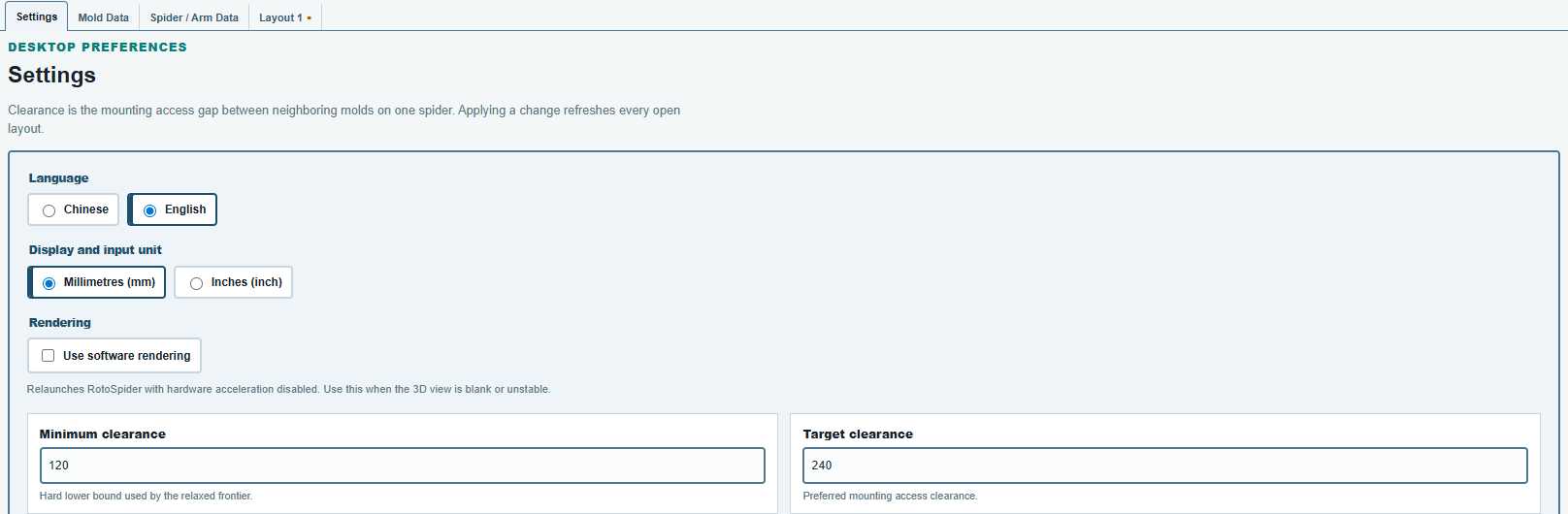
The Settings tab holds the desktop preferences: the language (Chinese or English), the display and input unit (millimetres or inches), and Use software rendering for a computer whose 3D view stays blank or unstable. Changing the rendering relaunches the app. The two clearance values on the same tab are explained in the chapter on setting up your factory's data.
The trial licence
The trial runs 30 days from its first start on your computer. The registered trial from www.rotospider.com/account/ runs 180 days from its first start on your computer, also on a computer that ran the 30-day trial. Neither trial runs past the date built into the program. After the trial ends the app shows RotoSpider trial expired at the top of its window and no longer loads the workbook or computes layouts.
On Windows, deleting the working folder's state folder or unzipping the download into a new working folder starts the trial over. Copying the whole working folder carries its trial clock with it.
A new version
On Windows, copy the new version's EXE into the same working folder, with the ZIP's program\runtime-<number>\ when the folder's program\ does not have it yet, and never the ZIP's data\trial\ over your own. The new version uses your data in data\trial\, and the older EXE stays and still runs. Each window's title carries its version, for example RotoSpider v0.8.23. Close the older version before the new one's first start: at that start the new version takes the open layouts, the language and the rendering choice of the RotoSpider version you used last.
- The English and the Chinese trial, and several versions of each, can sit in one folder. To compare two versions, open a copy of the same layout file in each, and save your work before you switch from one to the other.
- Keep each EXE's name as it came in the download: a renamed EXE may take or pass on another version's open layouts.
- An older version started for the first time after a newer one takes the newer one's open layouts; a layout it cannot read is set aside with a notice.
- A
program\runtime-<number>\that no version needs stays until you delete it. Ifprogram\runtime-1\is missing or damaged, copy the ZIP'sprogram\folder into the working folder again, replacing its files. - Pin the version's EXE, or a shortcut to it, to the taskbar, not the running window.
- A working folder shared with a Brimload trial (T1 or T3) is not supported.
- From 0.8.21 on, kept versions of one trial share the working folder's trial clock, so they stop together, and a version copied in after the trial ended starts expired; an earlier version runs to its own date.
- A Setup EXE from an earlier download is not a version EXE and does not go into the folder.
- A layout file saved by a newer version is not supported in an older one.
- To remove a version, delete its EXE; renaming it counts as deleting it. A later start of another EXE then deletes that version's program, recovery copies and support bundles, so send the bundle you need first (Send a support bundle).
On macOS and Linux, each program's name carries its version, so a new version installs beside the earlier one, and either version opens, also both at once. Both versions use your workbook and layout files under Documents, and the new version keeps the accepted agreement and the trial clock. Not supported on macOS and Linux:
- The 30-day and the six-month trial of one version side by side: they share a name, and the six-month one takes the place of the 30-day one.
- Layouts left open in one version are not open in the next; saved layout files open as before.
- A layout file saved by a newer version, in an older one.
- Shape creation and STEP import, which are Windows-only, and Intel Macs.
Data from an installed trial
On Windows, if a RotoSpider trial was installed on this computer with a Setup EXE, the first start in a working folder that has no data\trial\ yet copies its data from Documents\RotoSpider\trial\ into the folder's data\trial\, then adds the sample files that are missing. The download's ZIP carries data\trial\ with the sample workbook, so unzipped as it is, nothing is copied in: to bring the installed trial's data over, delete the folder's data\trial\ before the first start. The installed trial keeps its own data. What does not come along:
- From an installed 0.8.14, only the workbook comes. A mold with your own imported or generated shape shows
Shape unavailableuntil you set its shape again withChange Shape, and the settings start from the samples' values. Contact us at [email protected] if you need them brought over. - A workbook that 0.8.14 opened from another place: copy it yourself to
data\trial\masterdata.xlsx. - Open tabs and unsaved layouts: save them to files in the installed trial first.
- A layout file saved by 0.8.14 is not supported.
Close the installed trial before that first start. If the copy is interrupted, delete the folder data\trial\ and start the trial again: the copy is made afresh.
To start again from the samples, delete everything inside data\trial\ but keep the folder itself: without the folder, the installed trial's data is copied in again.
Removing it
Windows: close RotoSpider and delete the working folder, after copying out data\trial\ if you want to keep your data; layout files you saved elsewhere stay. macOS: drag the programs from Applications to the Trash. Linux: delete the AppImages. On macOS and Linux your workbook and layouts under Documents stay until you delete them yourself.
Comments and questions
The app's rules are our reading of the physics; where your plant knows better, the app changes.