RotoSpider manual › Choose the right shape for a product
Understand the space a shaped mold needs
Describes RotoSpider Desktop 0.8.14 · checked 2026-09-13 D5
A mold takes three kinds of room on a spider: its own shape, the clearance around it, and its share of the arm's rotation envelope. This page says how the app measures each for a shaped mold, so that what you see in the plan view and in the staging area's reasons makes sense.
Two sizes: the outside size in the row, the shape in the layout
Every mold's row on the Mold Data tab shows a footprint and a height. For a box that is the mold. For any other shape it is the shape's outside size, the smallest box the shape fits in, and the row shows it read-only because it comes from the shape. That box is what the workbook stores, what the tables print and what a planner reads.
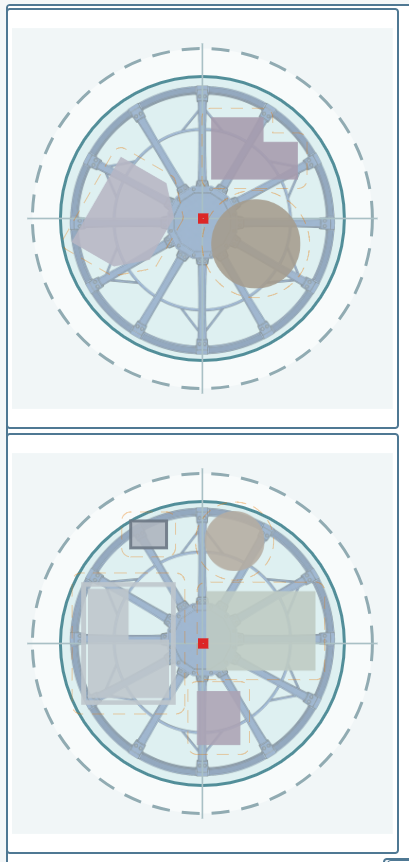
The layout does not place that box. When it looks for a place for a mold it works with the mold's real outline at each turn it tries, and when it accepts a place it checks the exact solid: the clearance to every neighbour, the spider's edge and the arm's envelope are all measured against the shape, not the box. In the plan view (2D) each mold is drawn by its outline, an L as an L, a triangle as a triangle, a tapered cylinder laid down as a trapezoid, a Levels Shape by the outline of all its levels together:
The clearance around a shape
The clearance from the Settings tab (the clearances page) is a distance between two molds, measured from surface to surface, wherever the two shapes come closest: a corner of one against a face of the other, an edge against an edge. It is not a box drawn around the mold. The dashed line in the plan view is that distance drawn around the mold's outline, so that where two dashed lines touch, the two molds are exactly one clearance apart; between a sphere and a box the dashed circle and the dashed rectangle touch at one point.
A round mold, a cylinder, a tapered cylinder standing up, a sphere, is round to the layout too: its neighbours can come in on the diagonal, where a box's corner would have kept them away.
The envelope and the spider's edge
The rotation envelope is the ball the arm sweeps as it turns, set on the Spider / Arm Data tab; the spider is the plate the molds are bolted to. Every mold, shape and all, must stay inside the envelope, and its foot must stay inside the plate. Both are checked on the exact solid: a tall sphere may pass the plate and fail the envelope; a long laid-down cylinder may pass the envelope and reach past the plate's edge. Ignore spider edge, the allowance in the staging area, drops the plate check for a mold you place by hand in that layout; nothing drops the envelope check.
When a mold does not fit, the status strip's sentence says which check it failed: the space left between the molds, the plate, the envelope, or the arm's load. A mold staged for the envelope is not helped by more clearance.
Turning a shaped mold
A plain box is tried as it is and turned a quarter. A built or drawn shape is tried at twelve headings, every 30 degrees, and an imported STEP shape at twenty-four, every 15 degrees; Deeper search in the Machines panel tries every whole degree for imported molds, slower and not always better. When you turn a mold yourself with the rotation ring in the scene, a shaped mold turns freely to any angle; a sphere, an upright cylinder and an upright tapered cylinder do not turn, because turning them changes nothing.
Balance
The mold's weight from its row sits at the centre of its outside size, whatever the shape; the balance the status strip reports as CG OFFSET is computed from that. A heavy frame on one side of a light mold is not seen; if it matters on your machine, enter the weight and let the layout place the mold, then look at the offset.
What this means for entering shapes
- Measure the mold on its frame, as it bolts to the spider.
- A shape does not need to be exact to the millimetre; it needs the air in its box to be shown as air. A hand's width matters, a degree of draft does not.
- A shaped mold that fails the envelope needs a bigger arm, not a better shape.
Comments and questions
The app's rules are our reading of the physics; where your plant knows better, the app changes.