RotoSpider manual › Compute and read a layout
Try another machine or a changed mold
Describes RotoSpider Desktop 0.8.14 · checked 2026-09-13 D5
Which machine should a job go on, and would a slightly smaller mold let one more on? Both are questions to answer before anyone changes a mold or signs for an arm, and both are answered on the layout tab without touching your master data.
Try another machine
Ask for the molds you actually need, then leave that request alone: it is what makes the comparison fair. In Machines, every arm of your workbook is listed with its model and arm type. Choose another with its round button and the same request is laid out again on that arm; the strip and the Load column tell you what it carries:
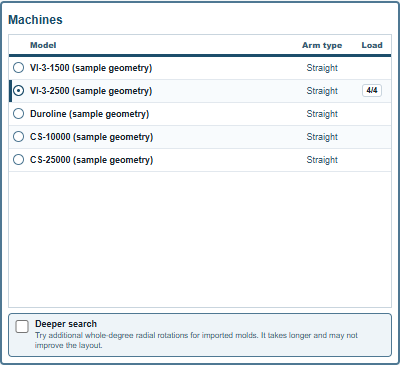
The Load column of the list shows the result for the machine that is selected, 4/4 here; the other rows are blank until you choose them. So a comparison is read one machine at a time: switch, wait for the recompute, read the strip, switch again. On the trial data, two DEMO-M01 and two DEMO-M02 are PARTIAL, two of four, on the VI-3-1500 and FEASIBLE on every larger arm. The loaded count against what you asked for is the answer.
For a comparison you want to keep side by side, open each machine's answer as its own layout: New gives a second tab with the same molds and machines behind it; type the same Need there, choose the other machine, and the two tabs hold the two answers. The files page shows how to keep them.
What if this mold were smaller
Edit Specs in the header of Products and Need opens every mold's length, width, height and weight for editing inside this layout only:
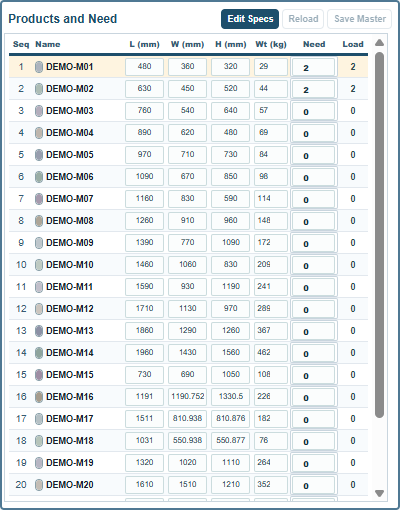
Change a number and the layout is worked out again as you type; for a cylinder, length and width move together, since both are its diameter. A banner above the tab says what state you are in:

Local spec override: Reload discards; Save Master writes to masterdata. Nothing you change here reaches the workbook: the mold on your shop floor has not changed, and a layout saved in this state carries the changed numbers as its own.
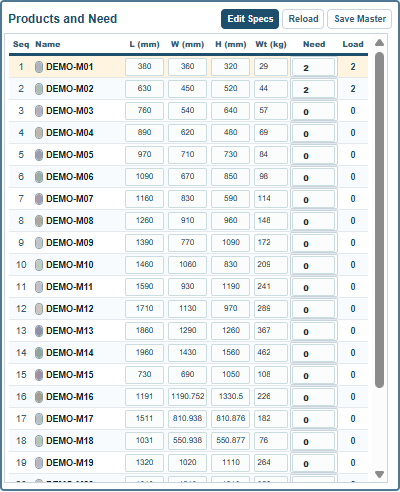
Two buttons end the experiment. Reload puts the workbook's numbers back and recomputes. Save Master is the deliberate step that writes the changed sizes and weights into the workbook for every layout that follows; it asks first, the same overwrite question as saving from the data tabs:

After it, the status reads Saved to masterdata. Other open layouts are now stale.: every other open layout keeps its result but shows a Stale mark until you press its Refresh, as the files page describes.
A mold with a built or imported shape keeps its shape's measured size; change that mold on the Mold Data tab with Change Shape instead.
Reading a comparison
Two things make a comparison misleading. The first is a different request on each arm: keep Need the same. The second is an arrangement you moved by hand on one arm and not the other: Solve anew on each gives the app's own answer for both, and the strip's MIN CLEARANCE and CG OFFSET chips say how comfortable each answer is beyond the count.
Comments and questions
The app's rules are our reading of the physics; where your plant knows better, the app changes.