RotoSpider manual › Choose the right shape for a product
Draw the outline of an irregular mold
Describes RotoSpider Desktop 0.8.14 · checked 2026-09-13 D5
When a mold's outline from above is not one of the built shapes, an oval tank, a rounded-corner frame, a hexagonal planter, a frame with a jog in it, draw the outline and give it a height. The editor keeps the outline closed and every corner exactly where you typed it, and the layout then fits the drawn outline rather than the box around it.
Opening the editor
On the Mold Data tab, select the row, press Change Shape and pick Draw footprint. The editor opens with a sample outline, six corners in an L, drawn in a top view with the 3D solid beside it:
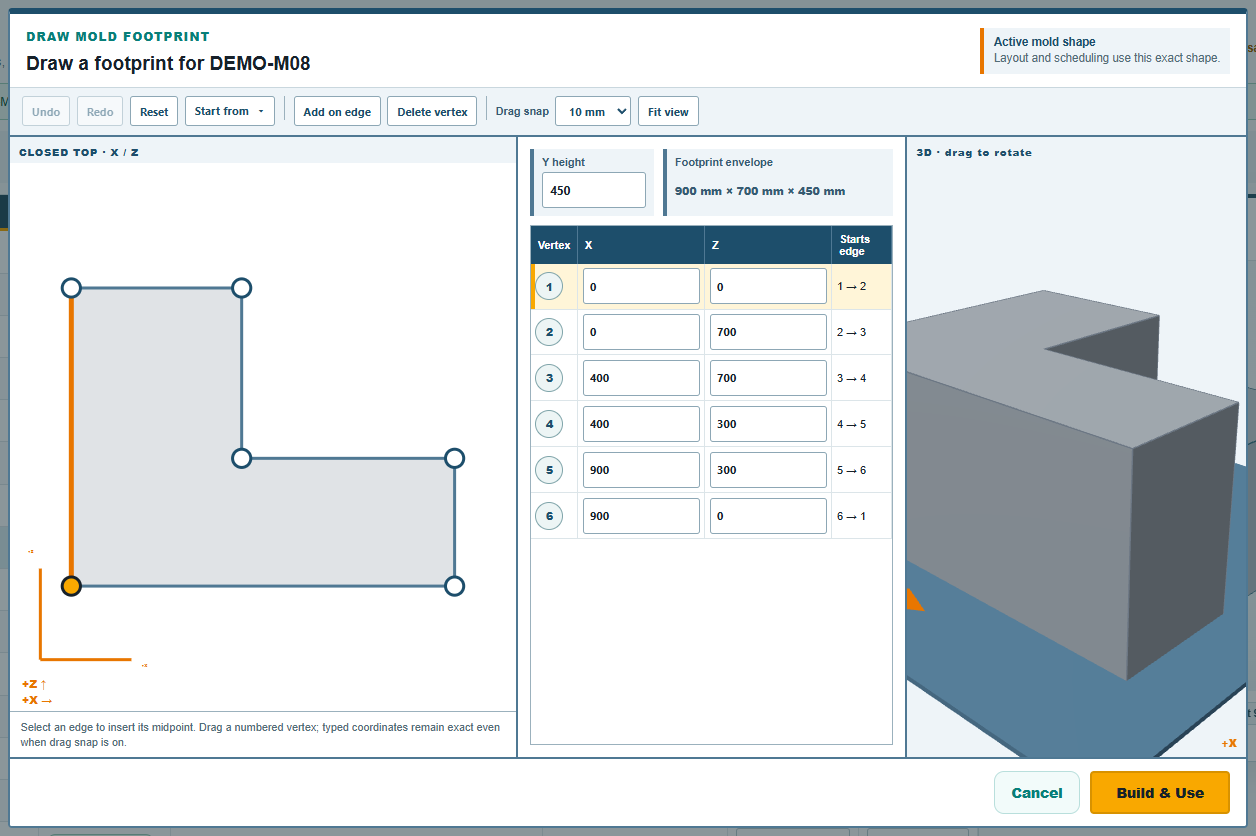
The top view is the plate seen from above: X to the right, Z up the page. Each corner is numbered, and the table on the right lists them in order with their Vertex 1 X and Vertex 1 Z positions in millimetres. The outline runs from each corner to the next and closes back to the first.
Drawing
There are three ways to shape the outline, and they mix:
- Start from a preset.
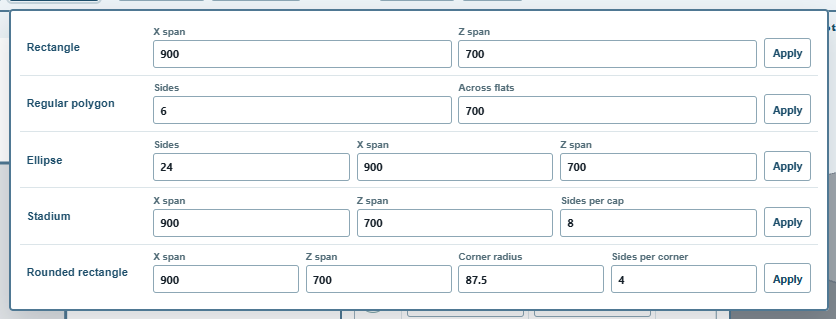
Start fromin the toolbar opens the outline presets: aRectangle, aRegular polygon, anEllipse, aStadium(two half-circles joined by straight sides) and aRounded rectangle. Give theX spanandZ span, and for the round ones how many straight sides to draw the curve with (Sides,Sides per cap,Sides per corner) or, for the polygon, itsSidesand its widthAcross flats; pressApplyon that row. The spans start out as the current outline's size. An oval tank is an ellipse; a rounded frame is a rounded rectangle with itsCorner radius; a stadium'sX spanmust be the longer one. - Drag a corner. Drag a numbered corner in the top view.
Drag snaprounds the dragged position to1 mm,5 mm,10 mm(the default) or25 mm, orOff; typed positions are never rounded. - Type the numbers. Click a row of the table and type the corner's X and Z. This is the exact way: a corner typed at 1234.5 stays at 1234.5.
To add a corner, select an edge (click it in the view or click the row of the corner it starts from) and press Add on edge: a new corner appears at the edge's midpoint, ready to drag. Delete vertex removes the selected corner; an outline keeps at least three. Undo and Redo step through your changes, Reset puts the sample back, Fit view recentres the drawing.
Then type the Y height, the mold's height above the plate, and press Build & Use.
What the editor refuses
The outline must be a simple closed shape: no corner in the same place as another, no edge crossing another, no corner touching a far edge, and it must enclose some area. When a drag or a typed number breaks that, the 3D view goes blank, a message names the fault ("polygon vertices contains a repeated vertex", for instance) and Build & Use is disabled until it is fixed. Undo is the quickest way back.
An outline can have up to 256 corners. A curve needs far fewer than that to be right for layout: an ellipse drawn with 24 sides, the preset's default, is within a few millimetres of the true curve at tank sizes, and every preset corner is rounded outward, so a preset never draws the mold smaller than it is.
After building
The row shows Drawn footprint as its shape, with the outline's outside width and depth as the footprint and the typed height. The preview draws the solid; the layout places it by its outline. The trial's DEMO-M19 and DEMO-M20 are drawn footprints. To edit the outline later, Change Shape reopens the editor on it.
A drawn footprint is one outline all the way up: the mold is the outline extruded to its height. A mold whose outline changes with height, a tapered bin, a hull, a dome, is the Levels Shape on the next page.
Comments and questions
The app's rules are our reading of the physics; where your plant knows better, the app changes.