RotoSpider manual › Set up your factory's data
A straight arm, parameter by parameter
Describes RotoSpider Desktop 0.8.14 · checked 2026-09-13 D5
A straight arm needs three measurements and an optional load limit. Take them at the machine with the spiders empty.
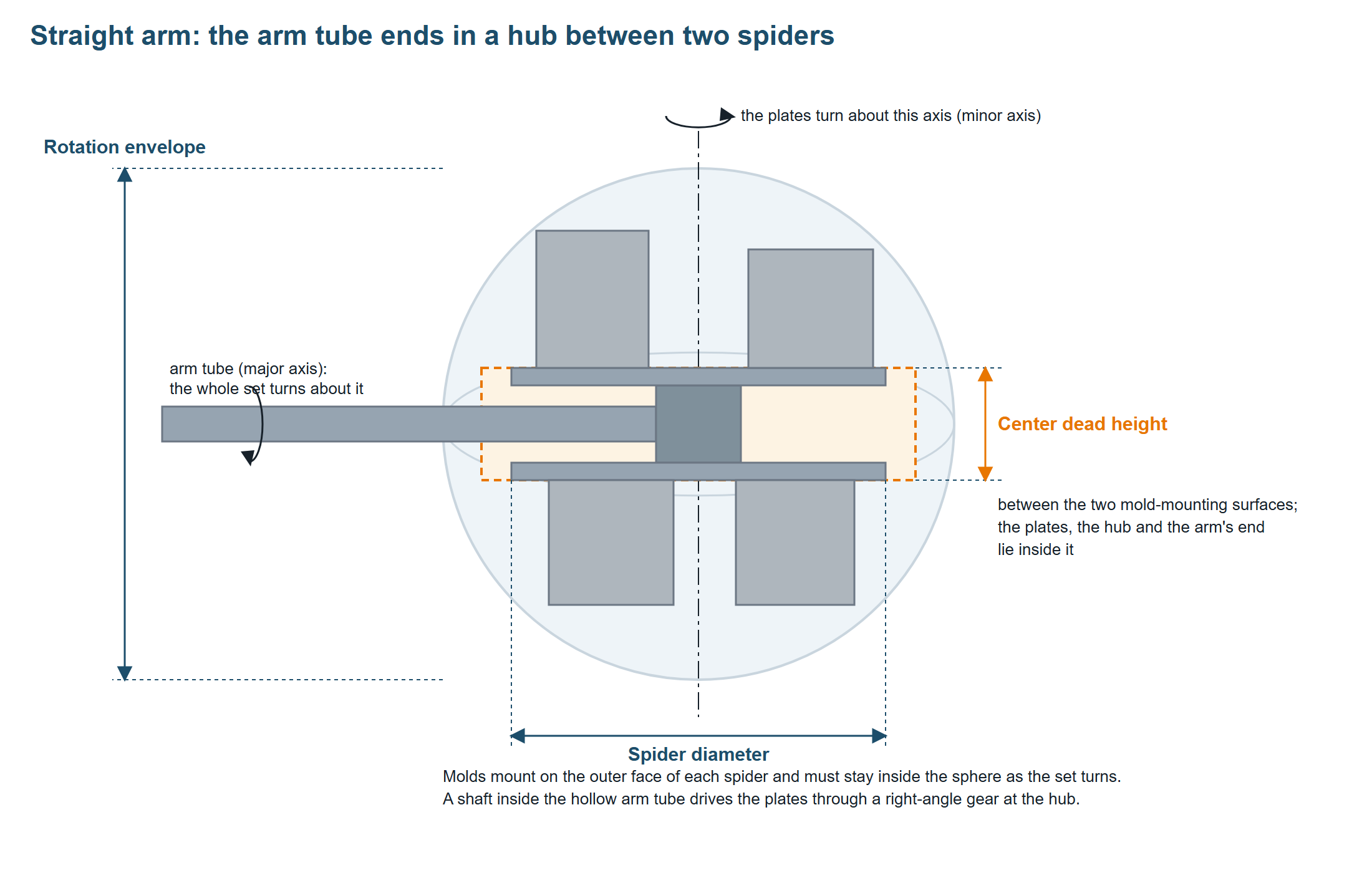
Two rotations are at work: the whole set turns about the arm tube's axis, and the two plates turn about the axis through their centres, driven by a shaft inside the hollow arm through a right-angle gear at the hub. "Above" and "below" on this page describe the position drawn; as the arm turns, the whole picture turns with it.
Spider diameter
What it is. The diameter of the mounting plate. Both spiders of a straight arm are the same size, so one number serves both.
How to measure. Across the plate through its centre, edge to edge. If the plate is a spider of arms rather than a full disc, measure to the tips of the arms; that is the circle a mold's foot may use.
Workbook column StraightSpiderDiaMm; on the tab Spider diameter (mm). Sample machines: 1200, 1600, 2400, 2600 and 3800 mm.
What the layout does with it. Two things. In plan view, every mold must sit inside this circle, so it decides how many molds fit side by side. It is also the smallest the envelope ball can be: if you enter an envelope smaller than the plate, the app uses the plate's size as the ball. If the two conflict, correct them against the machine drawing; a bigger ball in the app adds no room in the machine.
When it is wrong. Too small, and molds that would fit on the real plate are refused: the status strip says the remaining spider space is insufficient, and a single mold that cannot even sit centred says it "crosses the spider boundary". Too large, and the layout puts molds where there is no plate under them. If a real layout needs a foot slightly past the edge, the staging area's Ignore spider edge allowance lets you place it by hand for that layout; it does not change the workbook.
Rotation envelope
What it is. The diameter of the spherical swing limit for this arm. Its centre is where the arm tube's axis of rotation and the plates' axis of rotation meet, at the hub. Molds, risers and their fittings must stay within this limit.
In the arrangement drawn here the two axes meet at a right angle. Both rotations keep a corner of a mold at the same distance from the point where the axes meet. Its height above the plate and its reach sideways therefore share one spherical radius, which is why a tall mold has less room out near the edge. The ball is the reach the rotating set is allowed; it is not the path any one mold traces, and not the shape of the oven.
How to measure. Use the usable spherical swing diameter on the machine maker's mold-swing drawing for this arm, with the clearance allowances the drawing states, and check the limits it gives for the oven, the cooling station and the movement between stations. A separate usable width on the drawing is another limit to check; it is not the spherical diameter and not necessarily the plate's diameter. Doubling the distance to the nearest obstacle is not a substitute: the floor and the oven's end wall need not sit at the same distance, and the app checks only this one number.
Workbook column StraightEnvelopeDiaMm; on the tab Rotation / vertical envelope (mm). Sample machines: 1500, 1950, 2900, 3150 and 4550 mm.
What the layout does with it. The ball is the hard limit of every layout. A mold's height and its distance from the centre together decide whether its corners stay inside; a tall mold must therefore sit near the centre, a low one may sit far out. This is why two molds of the same footprint can lay out differently: the taller one has less room.
When it is wrong. The field must be a positive number; the app refuses to lay out on an arm without it. Too small, and molds go to the staging area with "height and footprint exceed the rotation envelope"; the strip's count shows how many. Too large, and the app places a mold that hits the oven; it checks only this number. The tallest mold a spider can take is the ball's radius less half the dead height, and less again for a wide footprint, because the mold's corners must stay inside the curve.
Further reading. The Association of Rotational Molders' guide to rotational molding machines explains the straight and offset arm mechanisms beside its Figure 8. Ferry Industries' straight-arm mold-limit drawing shows one manufacturer's spherical swing boundary, central gap and separate usable width. Use your own machine maker's drawing for the dimensions.
Center dead height
What it is. The distance between the two mold-mounting surfaces: from the top face of the upper spider down to the bottom face of the lower spider. The plates' own thickness, the hub and the end of the arm tube that drives them lie inside this distance. No mold can occupy it.
How to measure. A straight ruler from the upper plate's top face to the lower plate's bottom face, at the hub.
Workbook column StraightDeadHeightMm; on the tab Dead height / spider Y (mm). Sample machines: 240, 310, 410, 430 and 540 mm.
What the layout does with it. It sets where the two mounting surfaces sit in the ball: half the dead height above the centre and half below. Every mold then starts that far from the centre, which takes away from the room it has inside the ball. The band between the surfaces is kept clear.
When it is wrong. Zero or empty switches the rule off: both spiders collapse to the centre and molds get the widest part of the ball, more than the real machine has. Too large, and every mold's room shrinks; tall molds fall out of the ball first and are staged with the envelope message. If you drag a mold into the band by hand, the app refuses with "enters the center dead-height area".
Max load
What it is. The most mold weight the arm may carry, both spiders together.
Workbook column MaxLoadWeightKg; on the tab Max load (kg). Empty or 0 means the app does not check the weight. Sample machines: 500, 500, none, 1000 and 2800 kg.
What the layout does with it. It loads molds only up to the limit. When the request is heavier than the arm allows, the layout is partial and the strip says "would exceed the arm maximum load weight"; the app then prefers lighter molds first so that as many as possible are placed. A single mold heavier than the limit is never placed.
When it is wrong. Too small, and layouts stop short of the request for no visible reason on the plate; check the strip's message. Empty, and a heavy request is placed regardless.
Checking the three numbers
Look at the preview on the Spider / Arm Data tab after entering them:
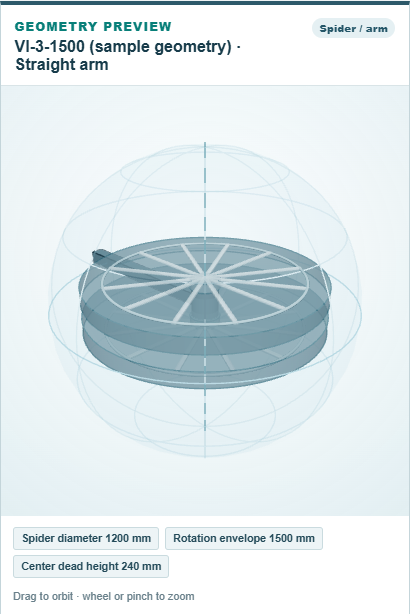
The plate should sit well inside the ball, with the gap between the two plates looking like the real machine. Then request one tall mold on the layout tab and watch it move toward the centre. If it is staged instead, read the reason in the status strip: an envelope message points at the rotation envelope or the dead height, a spider-space message at the plate's diameter, a weight message at the load limit.
Comments and questions
The app's rules are our reading of the physics; where your plant knows better, the app changes.