RotoScheduler manual › Start here
Install the trial
Describes RotoScheduler 0.3.4 · checked 2026-10-27 GMK
Download the RotoScheduler trial from www.rotospider.com/rotoscheduler/download/: on Windows unzip the .zip, which holds RotoScheduler and RotoSpider together, into a new working folder and run the RotoScheduler EXE in it, as described below; on macOS (Apple silicon, macOS 12 or later) unzip the .zip, open the disk image, drag both programs into Applications and open RotoScheduler, and allow it when macOS asks whether it may access your Documents folder; on Linux (Ubuntu 24.04 or newer) unzip the .zip, which holds both programs as AppImages, and run RotoScheduler-<version>-x86_64.AppImage (after chmod +x *.AppImage if your unzip tool dropped the execute permission), installing libfuse2t64 (sudo apt install libfuse2t64) if libfuse.so.2 is reported missing. On the first launch, read the trial licence agreement and click I Agree.
The trials are a beta in fast iteration, and upgrading a trial may not carry your data over automatically. If you run into trouble with this, contact us for support at [email protected].
The app has two page tabs, Scheduler and Settings. The Scheduler page opens on Sample factory, a two-week plan built from the trial workbook's molds; its first open takes several seconds. If you have been working on another plan, save it before clicking Sample factory to return to the example.
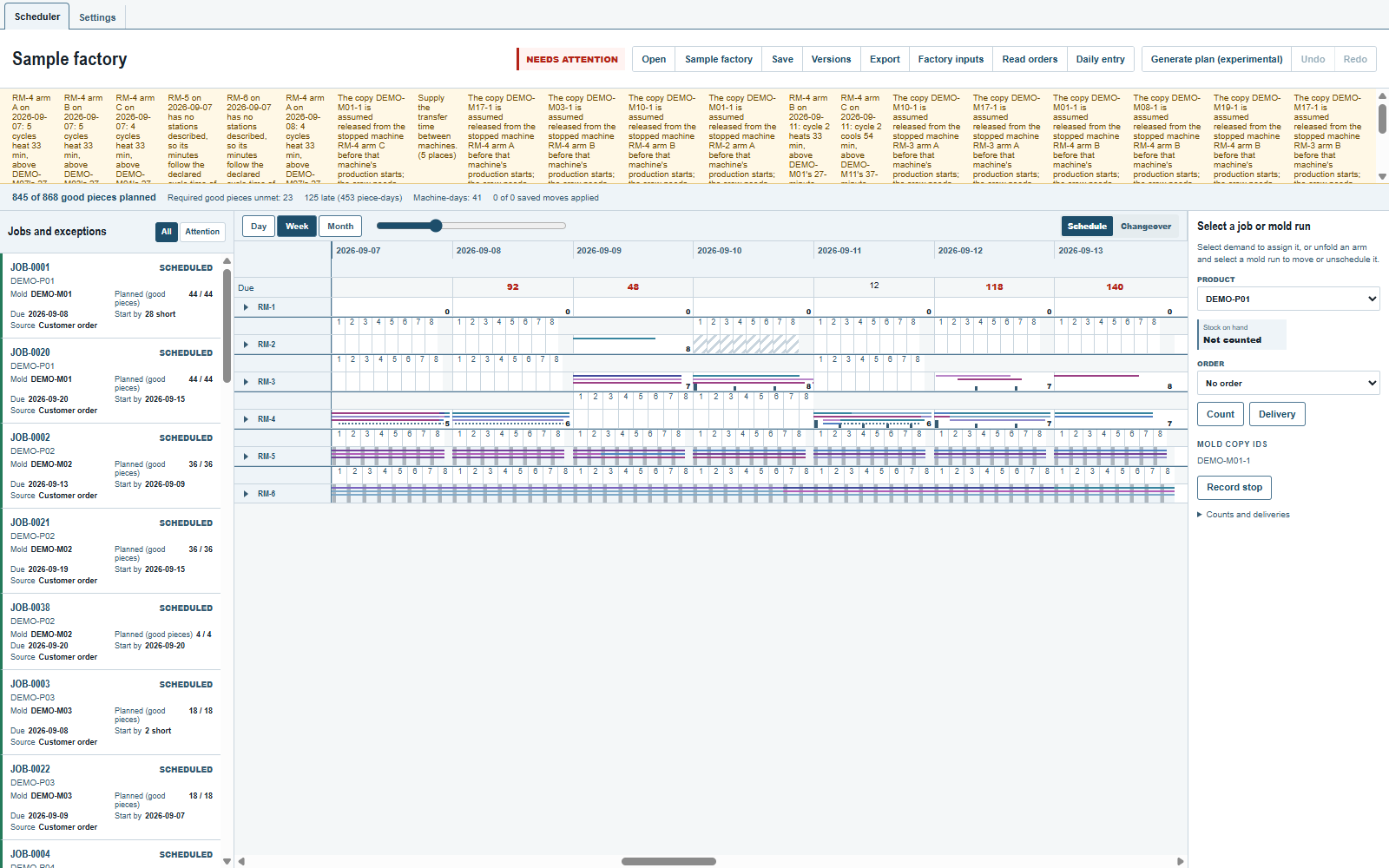
Machines run down the board and time runs across it. The arrow beside a machine opens its arm rows. The controls above the board choose the time span; the buttons above the plan line open and save files, manage versions and export sheets.
The trial account
The trial runs 30 days from its first start on your computer. The registered trial from www.rotospider.com/account/ runs 180 days from its first start on your computer, also on a computer that ran the 30-day trial. Neither trial runs past the date built into the program. After that the app reports that the trial has expired. Its machines, molds, jobs and process times are representative sample data, not the measured data of a plant.
On Windows, deleting the working folder's state folder or unzipping the download into a new working folder starts the trial over. Copying the whole working folder carries its trial clock with it.
Language and units
Settings holds the language (English or Chinese), the display and input unit (millimetres or inches) and the support-bundle switches. Settings and the trial account lists every control. Changing the language does not change the sample's product, mold or machine identifiers.
The working folder on Windows
Make a new working folder on this computer's own disk, near the root of a drive, for example D:\RotoTrial, and unzip the download into it, so that RotoScheduler_SCHEDULER_TRIAL_EN_<version>.exe, RotoSpider_TRIAL_EN_<version>.exe and the folders program\ and data\trial\ sit in that folder. Run the RotoScheduler EXE, and start RotoScheduler from it every time. If Windows shows its SmartScreen notice the first time, choose to run it anyway; the files are signed.
The folder keeps everything, for both programs: data\trial\ holds the trial's master data workbook, the settings and the shapes, which RotoSpider edits and RotoScheduler reads (Describe the factory), and data\trial\schedule\ the plan and its versions; program\ holds runtime-1\, which the versions of both programs share, and the unpacked versions, and state\ each version's support bundles (Send a support bundle) and your acceptance of the trial licence. To move to another computer, close both programs and copy the whole folder. Not supported: a working folder on a network drive or a USB stick, in a folder a sync tool manages, with a long path, or used by two Windows accounts.
To update, copy the new version's EXE into the same folder, with the ZIP's program\runtime-<number>\ when the folder's program\ does not have it yet, and never the ZIP's data\trial\ over your own. The plans in data\trial\schedule\ stay, the older EXE still runs, and each window's title carries its version, for example RotoScheduler v0.3.4. Close the older version before the new one's first start: at that start the new version takes the language of the RotoScheduler version you used last.
- Keep each EXE's name as it came in the download: a renamed EXE may take or pass on another version's language.
- A
program\runtime-<number>\that no version needs stays until you delete it. Ifprogram\runtime-1\is missing or damaged, copy the ZIP'sprogram\folder into the working folder again, replacing its files. - Pin the version's EXE, or a shortcut to it, to the taskbar, not the running window.
- A working folder shared with a Brimload trial (T1 or T3) is not supported.
- Run one version at a time on the folder, and save the plan to a file before you switch (Save and reopen a plan). To compare two versions, open a copy of the same plan file in each.
- From 0.3.3 on, kept versions of one trial share the working folder's trial clock, so they stop together, and a version copied in after the trial ended starts expired; an earlier version runs to its own date.
- A Setup EXE from an earlier download is not a version EXE and does not go into the folder.
- To remove a version, delete its EXE; renaming it counts as deleting it. A later start of another EXE then deletes that version's program and support bundles.
- The plans and versions of RotoScheduler 0.3.1 (kept in
data\scheduler-trial\by that version's folder) are not carried over, and a plan file saved by 0.3.1 or 0.3.0 does not open.
macOS and Linux
Both programs keep the trial's data in Documents/RotoSpider/trial/: the master data workbook RotoSpider edits and RotoScheduler reads, and the plan and its versions in schedule/. Each program's name carries its version, so a new version installs beside the earlier one and either version opens; the new version keeps the accepted agreement and the trial clock.
- Run one version at a time on the plan, and save the plan to a file before you switch (Save and reopen a plan).
- The 30-day and the six-month trial of one version cannot sit side by side: they share a name, and the six-month one takes the place of the 30-day one.
- The plans of RotoScheduler 0.3.1, kept in
Documents/RotoSpider/scheduler-trial/, are not carried over.
Comments and questions
The app's rules are our reading of the physics; where your plant knows better, the app changes.