RotoScheduler manual › Edit the plan
Move a run, then undo
Describes RotoScheduler 0.3.3 · checked 2026-10-16 D5
A small move on the sample:
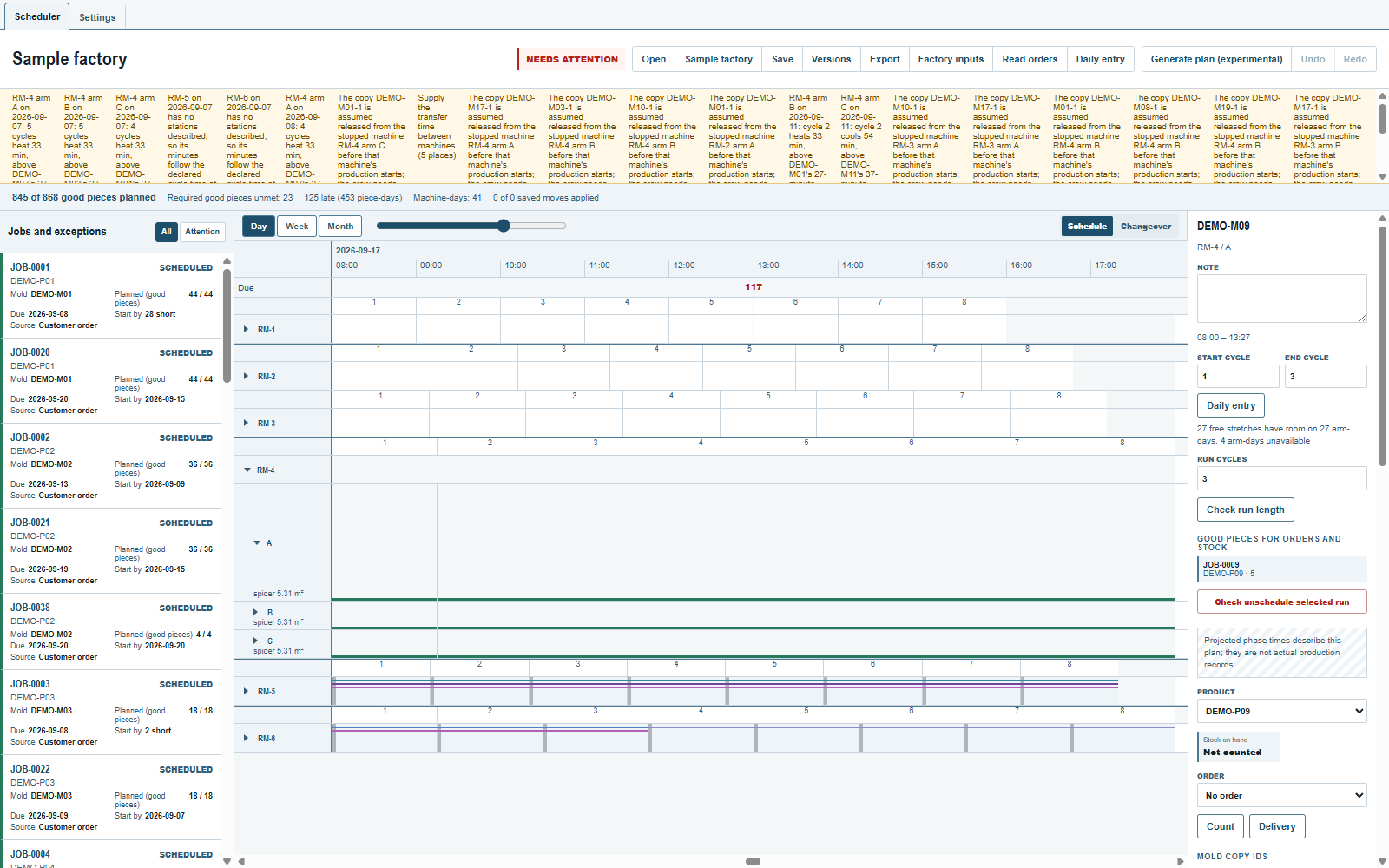
- Clear the selection. Go to September 7 in
Dayand unfoldRM-4. - Unfold arm
Aand click itsDEMO-M09band at cycle1, withoutCtrl.Start cyclereads1andEnd cycle5, the whole run; setEnd cycleto3. The inspector shows the three cycles' clock span. - Leave the run selected and click
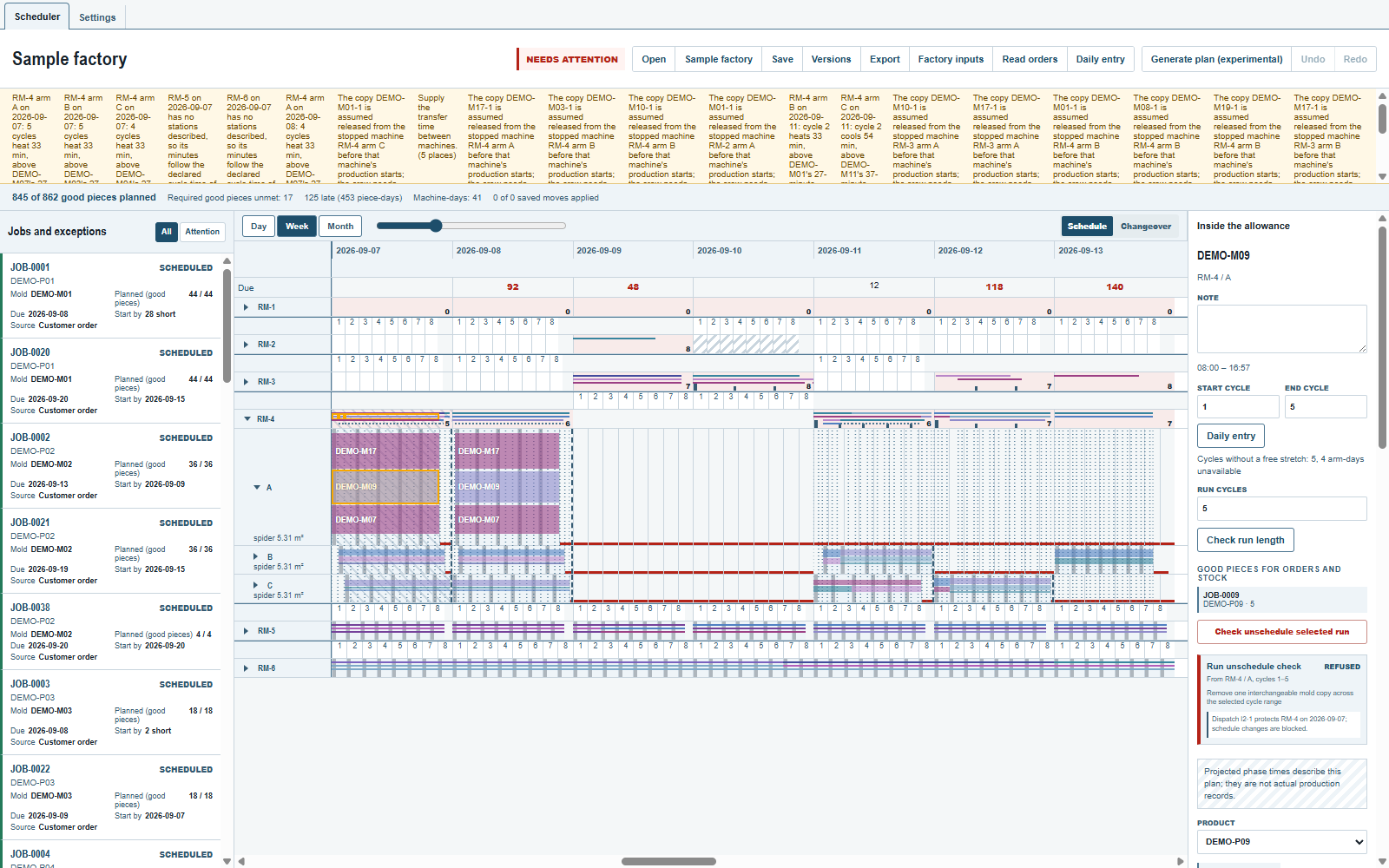
Month. Wait forFinding room…to finish: a green day box marks a day with room for the selected cycles. In this sample the first week has none for them; the green days begin in the second week. - Go to September 17 in
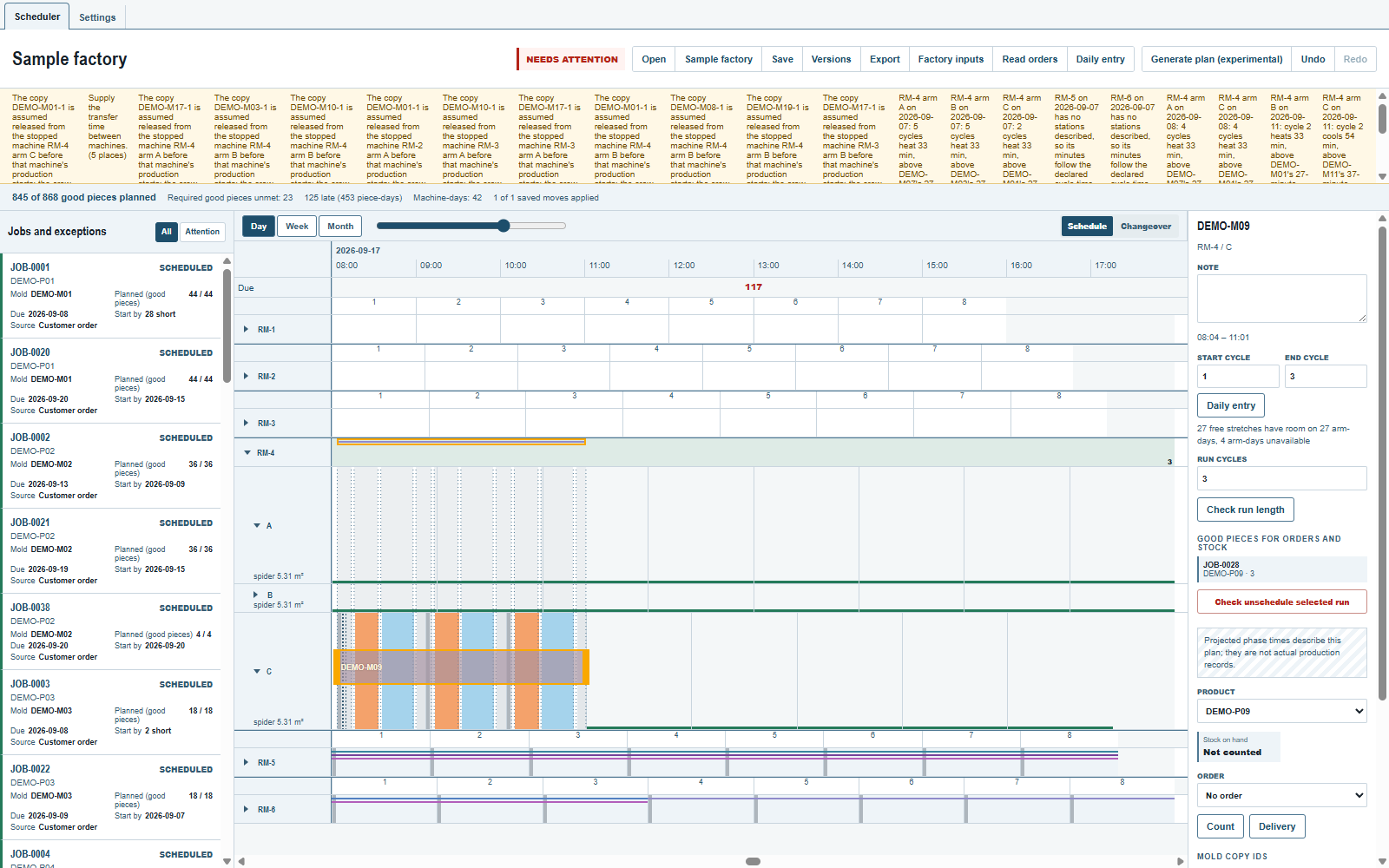
Day, the run still selected. Green lines along arms A, B and C mark available room. Use cycle1at the left end of arm C's row. - Click that green cycle to move the selected cycles there. They occupy cycles
1to3on RM-4 arm C, September 17; cycles4and5stay on arm A, September 7. - Click
Undoto put it back.Redorepeats the move;Undoagain restores the original sample plan.
Green and red room
Green space is where the selected range has room. Gray: the full check is running; hover for what has passed and what is still being checked. A drop on gray is checked at once. Yellow: it lands after a confirmation: the molds fit only at the minimum mold clearance, a cycle ends after the working hours, a maximum that is not verified is passed, or a mold copy is removed from another arm. Red takes nothing: a plain click or drop there only says why. Not supported:
- The places in view turn from gray one at a time, the place under the pointer first; a full week can take seconds, and every edit and every change of the selection, its cycles or its copies starts them again. A drop on gray is checked at once.
- A loaded cycle, where a mold would join the molds there, has no light; a drop there is checked; the
+of a selected loaded cycle lists what else fits. - A red stretch says why its first refused cycle is refused; a later cycle can be refused for another reason.
- The inspector's "{count} free stretches have room on {arms}" counts only the stretches found with room before the full check; a place whose run reaches a loaded cycle is not counted, whether its check is still running or has answered.
- Red is certain for the start a plain click or drop sends;
Ctrl+click (Mac:Meta+click) checks the cycle itself, which can still land, as today. - A co-loading rule marked "warn", a mold change inside a shift and heating or cooling limits that are not verified show green; their note is in the drop's check, and where that check is yellow for such a note alone the drop asks for
Apply with warning, as today. - Until a plant states how late a day may run, every cycle that ends after the working hours is yellow.
- The web demo keeps two colours until its next cut.
The app checks the destination before applying the move. If it asks for confirmation, read the warning in the inspector before applying. A refusal leaves the plan unchanged and says why. At a wider span, a drop on a green day box chooses the first suitable stretch on that arm-day.
A refusal gives its reason first. Where the reason concerns another place than the one you pointed at, it names that place: a mold copy in use elsewhere names the mold, the date and the cycle; a heating or cooling time past its approved maximum names the machine, the arm, the date and the cycle. Not supported:
- Your own place is named only in the inspector: "To {date} · {machine} / {arm}, cycle {cycle}" for a drop or a move; "From {machine} / {arm}, cycles {start}–{end}", with no date, for a move's source and a run's unschedule; an order's unschedule names no place.
- A copy missing at several cycles of one run is said once for each cycle.
- A saved edit that a reopened plan refuses says why and names the saved operation by its number, not its place.
- An arm without recorded dimensions cannot be planned by hand; its check lists its notes first.
A load keeps its own mold copies through edits, Dispatch and Report. A move takes those copies along; a copy that other loads still use that day is replaced by a free one. When moving only some copies, each cycle takes the first ones in that load's order and leaves the others.
A mold copy is in one place at a time. Where a run's copy sits on another arm that does not use it then, the move or drop removes it there itself, after that arm's last cycle before the run or before the shift, and again where that arm runs it later; the check turns yellow and lists each removal, such as DEMO-M07-1 is removed from RM-3 arm A after cycle 3 on 2026-09-10., and the plan keeps them. Where no removal frees the copy in time, the move is refused and says where the copy is. Not supported:
- A plan that already has a run without its mold copy keeps it; an edit is checked only for what it adds.
ApplyinFactory inputsgives such a run its copy where a removal does, and otherwise takes it off. - The copy is removed from an arm that does not use it at that cycle, after that arm's last cycle before the run or before the shift; the crew's time is not checked. On a fixed-arm machine the removal takes the mold's unmounting time at the service station, as a saved unmounting does.
- A copy is removed from one arm at most once a day: a second run needing it from the same arm that day is refused.
- A removal the app added stays when the run that needed it is moved again; saving drops it only if it can no longer be carried out.
- A copy whose arm starts the day with a part still in the mold cannot be removed before the shift: an edit needing it elsewhere that day is refused unless that arm runs a load first.
- With no mold transfer lag, a copy freed by its arm's next load reaches another machine in that same cycle only if that machine comes later in the plan's order (by name); place the run one cycle later.
- A copy removed from a machine with no stations described does not reach a fixed-arm machine the same day; such a move is refused.
Generate plan (experimental)can propose a mold removal before the shift. It does not propose a removal after a production cycle.- On the current day an edit can list a removal at a time that has already passed: a removal's time is not checked against the time now, so read the listed removals before applying.
What else fits in a load
Clear any job or run selection, then Ctrl+click a loaded cycle (Mac: Meta+click), or focus the cycle and press Enter. If no dispatch or report protects that position, the inspector offers + What else fits in this load.
Open the list to check the products in the job list with pieces left to plan on this machine. Each row shows the mold, the product and its jobs as {job} · {count} left. Gray says Checking; green fits by the light's rules; yellow fits with the reason shown. Refused molds are counted below the rows: hover over {count} molds do not fit here. to read their reasons. When no candidate fits, the list says Nothing else fits in this load.
Click a row to select its first job and check adding one mold copy for one production cycle. The drop's own check runs: its green result applies at once, a warning waits for Apply job assignment with warning, and a refusal says why without changing the plan. A green row can still ask for confirmation of a note that the light does not colour, such as an unverified process window. The pieces go to the product's jobs as with a drop; selecting a job does not promise that it receives the pieces first.
An edit, a change of the selection or of the plan closes the list. Open it again for a fresh answer. For more copies or cycles, use the job's Copies and Cycle slots fields and drop it onto the cycle. The web demo has no +.
Stretch or shorten a run
Click a mold band to select its run; Start cycle and End cycle cover the whole run, and Run cycles shows how many cycles are selected. Type another number and click Check run length: a larger number adds cycles after the run's last one, carrying the molds and copies of that cycle; a smaller number takes cycles off the run's end. The inspector's Run length check answers as a drop's check does; Apply run length applies it, a warning is read first, and a refusal says why without changing the plan. The added pieces go to the mold's products and their jobs as the engine deals them.
A move that would run late (0.3.0)
A drop, move or unschedule cannot change a cycle protected by a dispatch; the refusal names that dispatch. Take back frees only cycles and mold removals that had not begun according to their dispatched times. New work on an unprotected cycle is allowed even if its projected start is before now. The current plan's times do not decide dispatch protection. See Dispatch and Take back.
A drop that makes a scheduled cycle end after the window turns the preview yellow, with a sentence naming the arm, the cycle and its end: "{machine} arm {arm} on {date}: cycle {cycle} ends at {end}, after the working window's end at {window}." Other cycles of that day may move in the preview before you apply; that is the re-timing, not an error. Click Apply with warning to proceed anyway, or Cancel.
The green and red room of Move a run, then undo is still found on the plain cycle grid.
A certified oven maximum (0.3.0)
A mold's plant-approved maximum heating or cooling time is kept, not only its target. On a fixed-arm machine, one arm's long heat can hold a neighbour in the oven past its own approved maximum. Generate plan (experimental) refuses to build a cycle that would do that, and a move that creates or worsens such an overrun is refused like a window overrun, or shown as a yellow warning when the maximum is only estimated. A mold mounted at a day's opening, not scheduled by this plan, is reported but not refused.
A click on a run selects it from that cycle to its end on that date, with every copy it shows; Copies takes fewer. The selected copies move together, as one step to undo, and a move that does not fit them all is refused whole. Undo and Redo, or Ctrl+Z and Ctrl+Y outside a text field, step through applied changes. Dispatch and Take back restart that history; earlier hand edits cannot be undone afterwards.
Comments and questions
The app's rules are our reading of the physics; where your plant knows better, the app changes.