RotoScheduler manual › Jobs and the factory
Describe the factory
Describes RotoScheduler 0.3.3 · checked 2026-10-16 D5
Open Factory inputs to set the plan's dates, machine-day capacity, products and orders.
Mold data and arm geometry come from RotoSpider's master data workbook. In a desktop pair supplied with one shared data folder, keep those facts in RotoSpider and use Take from masterdata to bring them into the plan.
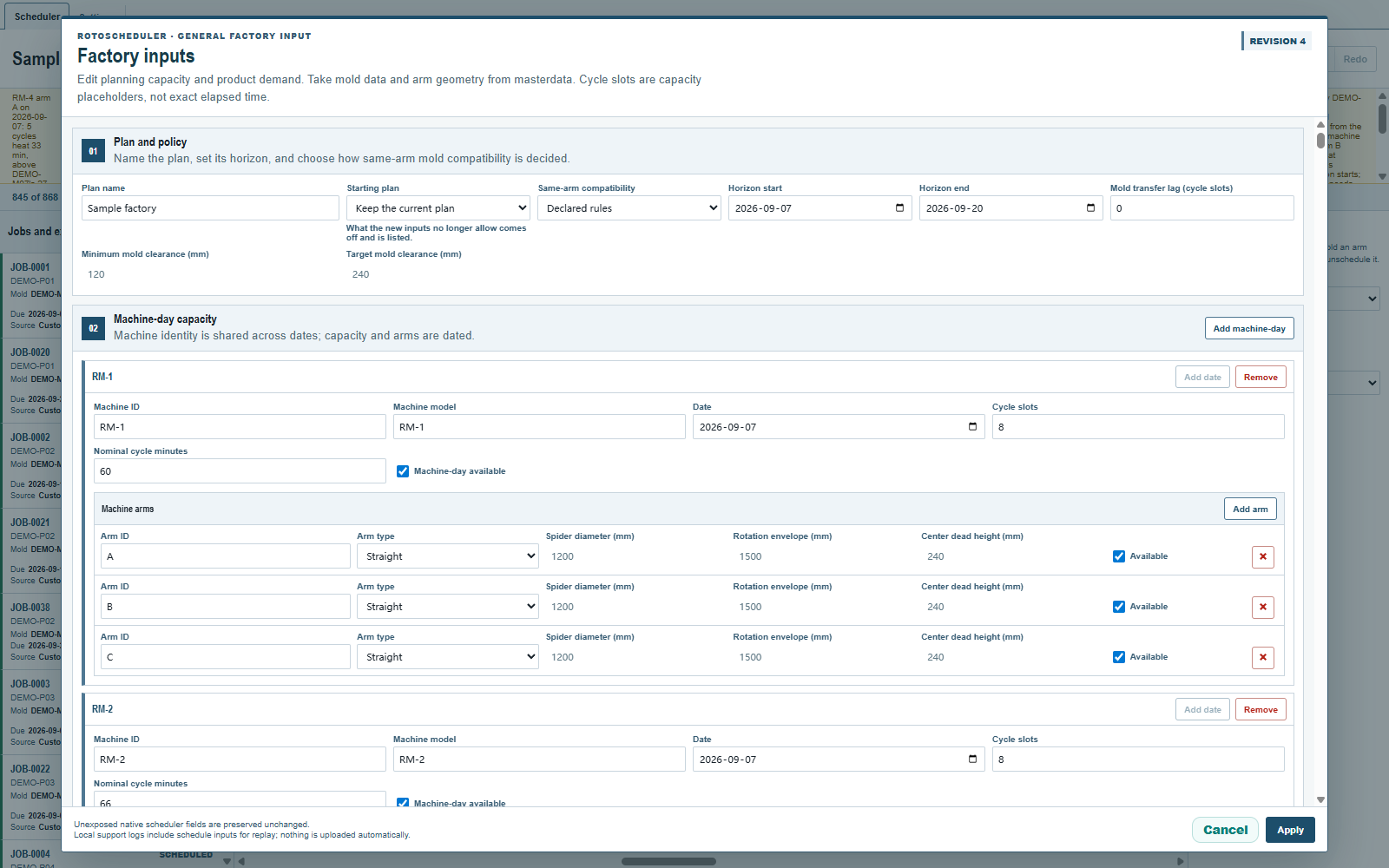
Take from masterdata
- Save mold and arm changes in RotoSpider. Save the minimum and target mold-to-mold clearance in its settings.
- In RotoScheduler, open
Factory inputs. UnderMolds and output, clickTake from masterdatabefore editing any field. - Review the molds, the arms' measurements, any
Rows left outandLower copy counts in the workbook. Check that each product still names the mold that makes it. - Leave
Starting planonKeep the current planand clickApplyto accept the inputs and check the plan again.Canceldrops the proposed inputs.
The command reads the saved workbook and settings each time. Saving in RotoSpider alone does not change the plan. RotoScheduler never writes these changes back to the workbook.
The button is offered only before any edit, including a color edit, and only once per opening. After an edit or Read orders, apply or cancel, then reopen Factory inputs to take from masterdata.
Molds
The molds follow the workbook's row order. Their names, dimensions, shapes, weights, parts per cycle, materials and process classes come from the workbook, as read by RotoSpider. Dimensions appear in millimeters here. Wall thickness, other features and a numeric minimum machine are also taken where stated.
A mold new to the plan gets its copies once, using the workbook's count; a blank or zero count gives one copy. Each copy has its own ID, shown read-only under Mold copy IDs beside Mold copies.
A later take keeps those copies and their IDs. A higher workbook count adds copies after the existing ones. A lower count keeps all the plan's copies and lists the mold under Lower copy counts in the workbook, with both counts and the kept IDs. A blank or zero count lists nothing. Lowering that count alone does not take its loads off or refuse Apply because a copy is mounted.
An existing mold is matched by its name. It keeps its RotoScheduler color, Good share %, Basis and any stated process times or sharing attributes. A newly added mold starts with its workbook color. Products keep their selected mold; they are not moved to whichever mold now occupies the same row.
A deleted or renamed workbook mold no longer appears under its old name. A renamed mold is a new mold with new copies and IDs. If a product still names the old mold, Apply is refused. Select the correct Mold ID in Products and stock, or cancel and correct the workbook before taking it again.
Rows left out
Rows left out gives the workbook row number, mold name and reason for each omitted row:
| Reason | What to do |
|---|---|
Mold dimensions must be greater than zero. |
Complete the mold's dimensions in RotoSpider or the workbook, then take again. |
Mold weight must be greater than zero. |
Enter the mold's weight, then take again. |
The mold shape is unavailable on this computer. |
Restore the shape with the workbook in the shared data folder, or ask support to help, then take again. |
A product that still names a mold left out of the take prevents Apply until you select an available mold for it.
Machine models and arms
RotoScheduler keeps the factory's machines and dates. Each machine's Machine model must match the workbook's model text exactly. The take updates every dated arm of that machine from the matching model and arm type.
- A straight arm takes the spider diameter, rotation envelope diameter and center dead height.
- An offset arm takes the spider diameter, vertical and horizontal envelope diameters, spider Y offset and riser heights.
- Both take the maximum load weight. If the workbook states no limit, an earlier limit is cleared.
A model or arm type with no matching workbook row keeps its existing geometry. After adding a machine-day or an arm, or changing a model or arm type, apply the edit, reopen the dialog and take again. Until then, a new arm can still have the form's default dimensions.
What can be edited here
| Input | In Factory inputs |
|---|---|
| Plan name and dates | Editable. The plan has its own first and last dates. Loads outside changed dates come off and are listed, except protected dispatched work. See below. |
| Machine-day capacity | Edit the machine and date, Cycle slots, Nominal cycle minutes and availability. Machine identity is shared across dates; capacity and arm availability are dated. |
| Machine arms | Edit Arm ID, Arm type and Available. The displayed spider diameter, rotation or vertical envelope and center dead height are read-only. |
| Molds | Mold ID, Mold name, length, width, height, weight, Mold copies, the adjacent Mold copy IDs, Parts / cycle, material and process class are read-only. |
| Mold color and good share | Color, Good share % and Basis remain editable. A color-only edit uses Save colours and keeps the plan. See Mold bands and colours. |
| Mold-to-mold clearance | Minimum mold clearance (mm) and Target mold clearance (mm) are read-only. |
| Products and stock | Each product names one mold and may have a stock rule. Edit its name, mold, Safety stock, Target stock and Stock allowance here. Stock counts and deliveries are recorded in the inspector with Count and Delivery. |
| Orders | Each sales order names a product. Edit its number, customer, ordered quantity, minimum, maximum, due date, priority and allowed machines. See Minimum, wanted and maximum and The machines an order may run on. |
Maintain mold data, arm geometry and maximum load in RotoSpider, and save the mold-to-mold clearances in its settings. Then take and apply them here.
Cycle slots counts the available production cycles; Nominal cycle minutes is a reference duration. Neither is a measurement of heating or cooling time.
An order needs a product. Choose an existing product or New product and its mold when adding an order. Stock belongs to the product: products that use the same mold do not share stock. Order number may repeat, and changing it keeps the order's planned pieces. If removing a machine leaves an order naming it, choose a remaining machine for that order before applying.
Read orders
On the desktop, click Read orders beside Factory inputs and select a reading file prepared from the plant's workbooks. The form shows proposed orders, new rows, changed dates and quantities, orders absent from the sheet, refused rows and the date the shipped totals run through.
Rows first match by order number and due date. Where those repeat, the first row is used. Remaining rows with the same number pair in date order. Review the matches, especially when one order number has several deliveries. Correct dates and quantities in the proposed rows before Apply; Cancel leaves the document unchanged. A missing row does not mean delivered or canceled, so that order stays.
At an accepted Apply, an increase in an order's shipped total adds a delivery for the difference, dated through the reading's stated day. An unchanged total adds nothing. A total below the recorded deliveries is listed and adds no delivery. Use Correct under Counts and deliveries in the inspector for an incorrect delivery record. An order with a delivery record offers Close instead of removal. After Close and Apply, it shows Closed, keeps its deliveries and owes no further pieces. Count, Delivery, Correct and Close are described in Count, Delivery and Report.
Same-arm compatibility
Same-arm compatibility decides whether two molds may share an arm. Declared rules uses the rules alone. Historical practice requires a matching production record for every pairing. Rules decide, practice admits also admits a pairing supported by a production record when an overridable rule would refuse it, and warns about each rule bypassed. Rules that cannot be overridden still refuse the pairing.
The plan's dates
Horizon start and Horizon end are the working plan's own dates. When they change, unprotected loads outside them come off and are listed above the board. A dates-only Apply is a plan edit: Undo restores the old dates and loads. Opening a named version uses that version's dates.
A dispatched cycle before the first date still supplies pieces unless counted or reported; it is not on the board. A protected dispatched day after the last date stays in the plan. To report a cycle before the first date, move the first date back. Apply a date change first if you also need to change facts of a dispatched day that will fall before it.
Applying a change
With Keep the current plan, Apply checks the plan against the new facts. What still fits stays. When changed dimensions, clearance or compatibility make a mold group on one arm in one cycle no longer fit, the whole group comes off, including the other molds that shared it. Further groups may come off if the remaining plan no longer works after those removals.
The list above the board gives the date, machine, arm, cycle, molds and reason. Review this list and the remaining demand before placing work again. Extra work is not placed automatically.
While dispatched work remains protected, the dialog keeps the current plan and offers no Starting plan choice. A change that removes a needed machine-day, arm or mold, or makes protected work no longer fit, is refused. Review the named dispatch. Take back can free only work that had not begun according to its dispatched times; it cannot free work already started. See Keep a named version.
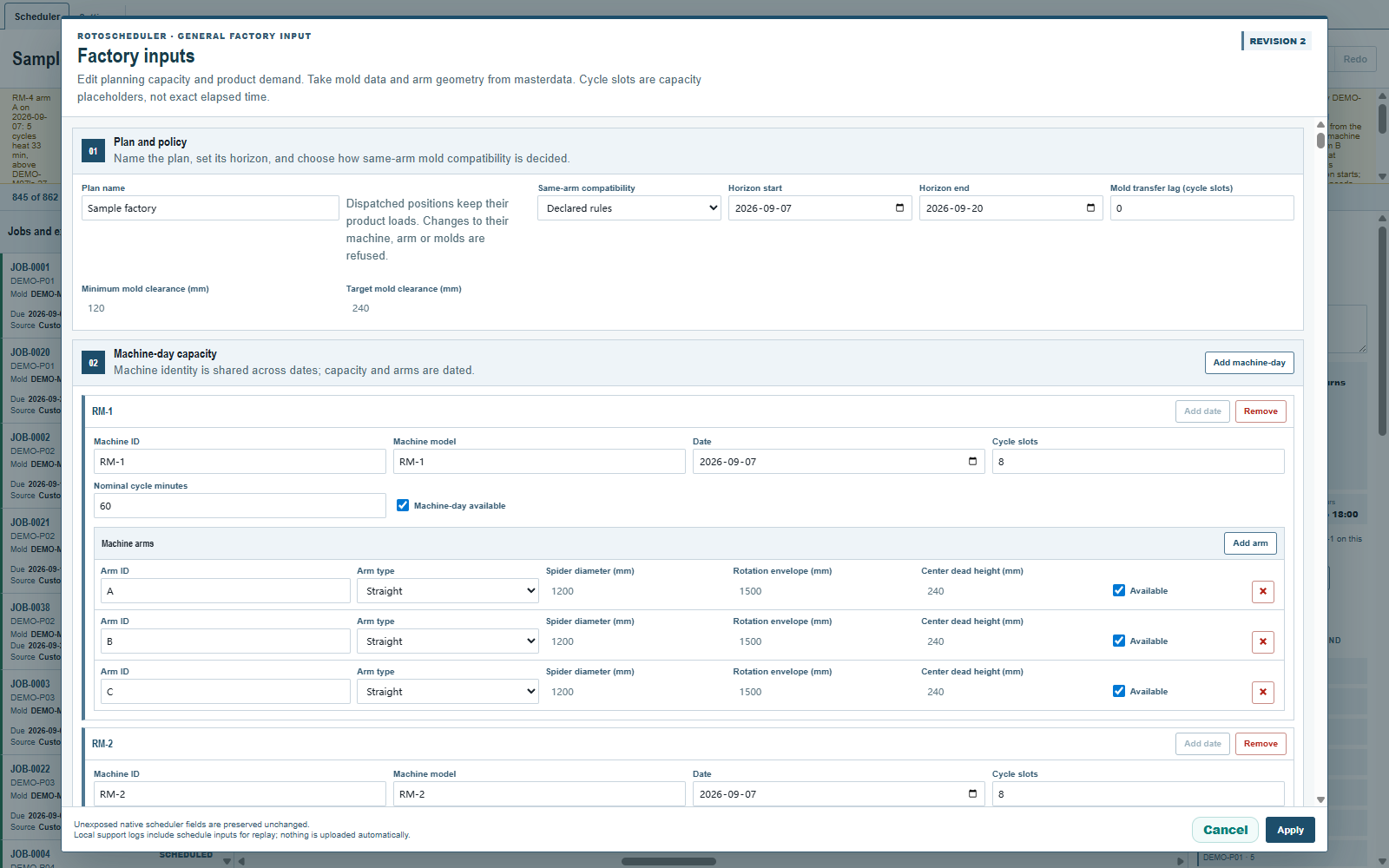
Where offered, Automatic plan and Blank manual plan replace the plan at Apply. A blank manual plan still needs the factory's molds and machine-days. Applying factory inputs restarts Undo, even when the current plan is kept, unless only the plan's dates changed. Save a file before changing facts you may need to restore. Cancel keeps the current document.
See What is not supported for workbook, sample and file limits.
Comments and questions
The app's rules are our reading of the physics; where your plant knows better, the app changes.